What’s uv?
UV is an ultra-fast Python package manager written in Rust by the Astral team. You might already be familiar with another great product from Astral - ruff (popular Python linter).
It drastically reduces dependency installation time and produces smaller, optimized Docker images—ideal for enhancing your Django project’s Docker workflow. Let’s dive in!
Quick start
Follow these simple steps to get your local environment ready:
uv venv # 1. Create a UV Virtual Environmentsource .venv/bin/activate # 2. Activate the Virtual Environmentuv sync --all-groups # 3. Install Project Dependenciesdocker-compose up --buildNote: This installs both production and development dependencies.
Use uv sync --no-dev if you want production-only packages.
Dockerfile
Here’s a breakdown of a Dockerfile designed specifically for Django applications using UV to manage Python dependencies:
FROM ghcr.io/astral-sh/uv:python3.13-bookworm-slim AS baseFROM base AS builder# Set up environmentENV PYTHONDONTWRITEBYTECODE=1 \ PYTHONUNBUFFERED=1 \ UV_COMPILE_BYTECODE=1 \ UV_LINK_MODE=copyWORKDIR /app# Install the project's dependencies using the lockfile and settingsRUN --mount=type=cache,target=/root/.cache/uv \ --mount=type=bind,source=uv.lock,target=uv.lock \ --mount=type=bind,source=pyproject.toml,target=pyproject.toml \ uv sync --frozen --no-install-project --all-groups# Then, add the rest of the project source code and install it# Installing separately from its dependencies allows optimal layer cachingCOPY . /appRUN --mount=type=cache,target=/root/.cache/uv \ uv sync --frozen --all-groupsFROM baseCOPY --from=builder /app /appENV PATH="/app/.venv/bin:$PATH"EXPOSE 8000CMD ["uv", "run", "python", "manage.py", "runserver", "0.0.0.0:8000"]Base image
We start by leveraging a slim Python image with UV pre-installed, optimized for minimal size and maximum speed.
FROM ghcr.io/astral-sh/uv:python3.13-bookworm-slim AS baseFROM base AS builderEnvironment setup
PYTHONDONTWRITEBYTECODE prevents Python from writing .pyc files to disk.
PYTHONUNBUFFERED ensures immediate logging output.
UV_COMPILE_BYTECODE compiles Python bytecode for faster startup.
UV_LINK_MODE=copy configures UV to copy dependencies instead of symlinking (improving compatibility).
UV_PROJECT_ENVIRONMENT sets the virtual environment path.
!Permission denied issue: You might encounter permission issues when using the default virtual environment paths provided by UV as and I faced:

You can handle this issue in two ways:
-
(Recommended) By adding second volume entry(
/app/.venv) in your docker-compose file. Since the.venvdirectory in the container is now completely isolated from your host filesystem and Docker can’t change ownership or permissions on your local.venvfolder, which solves your permission issues. -
By explicitly setting
UV_PROJECT_ENVIRONMENTto a dedicated path (/app/venv), we create a clean separation from default or locally-created environments, effectively resolving permission conflicts.
Dependency installation (optimized caching)
This example is adapted from the official UV example: Dockerfile
RUN --mount=type=cache,target=/root/.cache/uv \ --mount=type=bind,source=uv.lock,target=uv.lock \ --mount=type=bind,source=pyproject.toml,target=pyproject.toml \ uv sync --frozen --no-install-project --all-groupsUV installs dependencies from pyproject.toml and uv.lock.
⚠️ Important:
Here, I’ve used --all-groups to install every dependency group defined in pyproject.toml (including development dependencies like linting tools). For production builds, consider switching to --no-dev to install only production dependencies. For detailed guidance on managing dependency groups, refer to the official Dependency Groups documentation.
Adding project source and finalizing installation
COPY . /appRUN --mount=type=cache,target=/root/.cache/uv \ uv sync --frozen --all-groups!Note: I’ve also used --all-groups in there.
By adding your project’s source after installing dependencies, Docker efficiently caches layers, speeding up rebuilds when code changes occur.
Final runtime stage
FROM baseCOPY --from=builder /app /appENV PATH="/app/venv/bin:$PATH"EXPOSE 8000CMD ["uv", "run", "python", "manage.py", "runserver", "0.0.0.0:8000"]In this final image: ✅ Only the necessary files and pre-installed dependencies are copied from the builder stage. ✅ Django runs within UV’s isolated virtual environment.
⚠️ Important Considerations:
- Production Use:
This setup uses Django’s built-in development server (
runserver). For production environments, consider switching to a production-grade server likegunicornoruvicorn. - Running Commands with UV:
After configuring your virtual environment with UV, you MUST prefix your commands with
uv run, e.g.:
uv run python manage.py ...uv run pytest -s -vOtherwise, commands executed outside UV’s context will fail.
Here’s how can look like your start.sh:
#!/usr/bin/env bashset -o errexitset -o pipefailset -o nounsetset -o xtraceuv run wait_for_postgres.pyuv run manage.py migrateuv run manage.py runserver 0.0.0.0:8000Your optimized Dockerfile is now ready, resulting in faster builds, smaller images, and better caching strategies for your Django application.
Here’s quick time comparison:
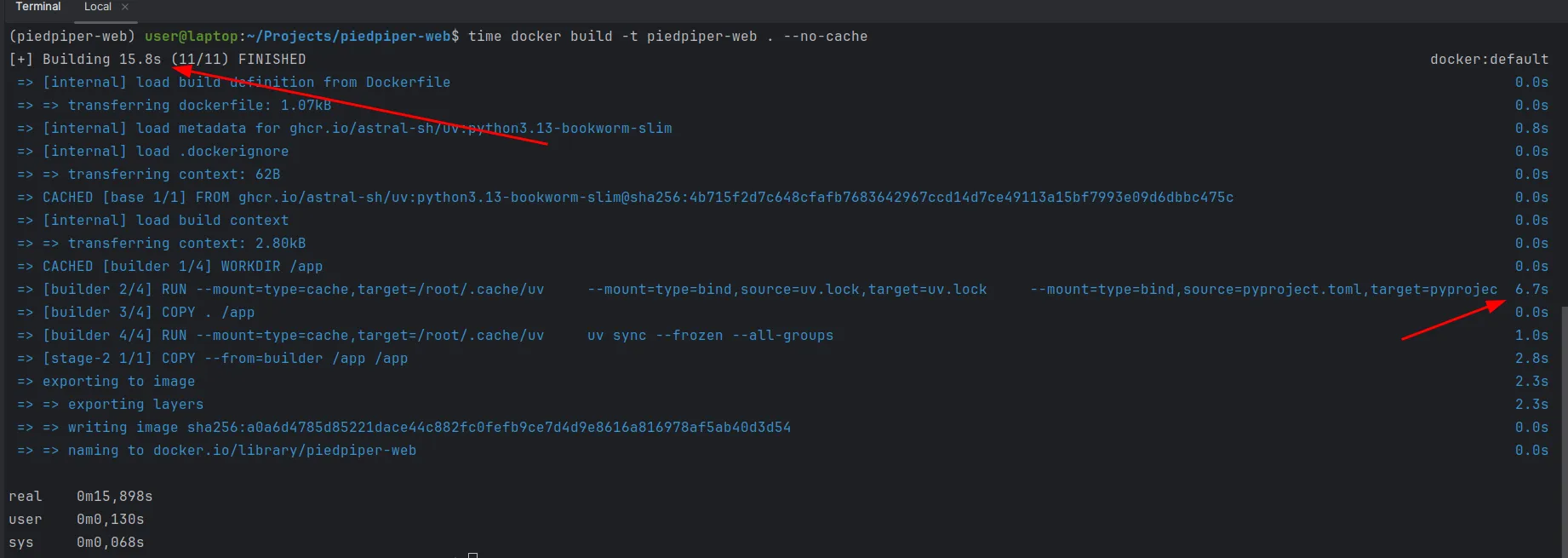
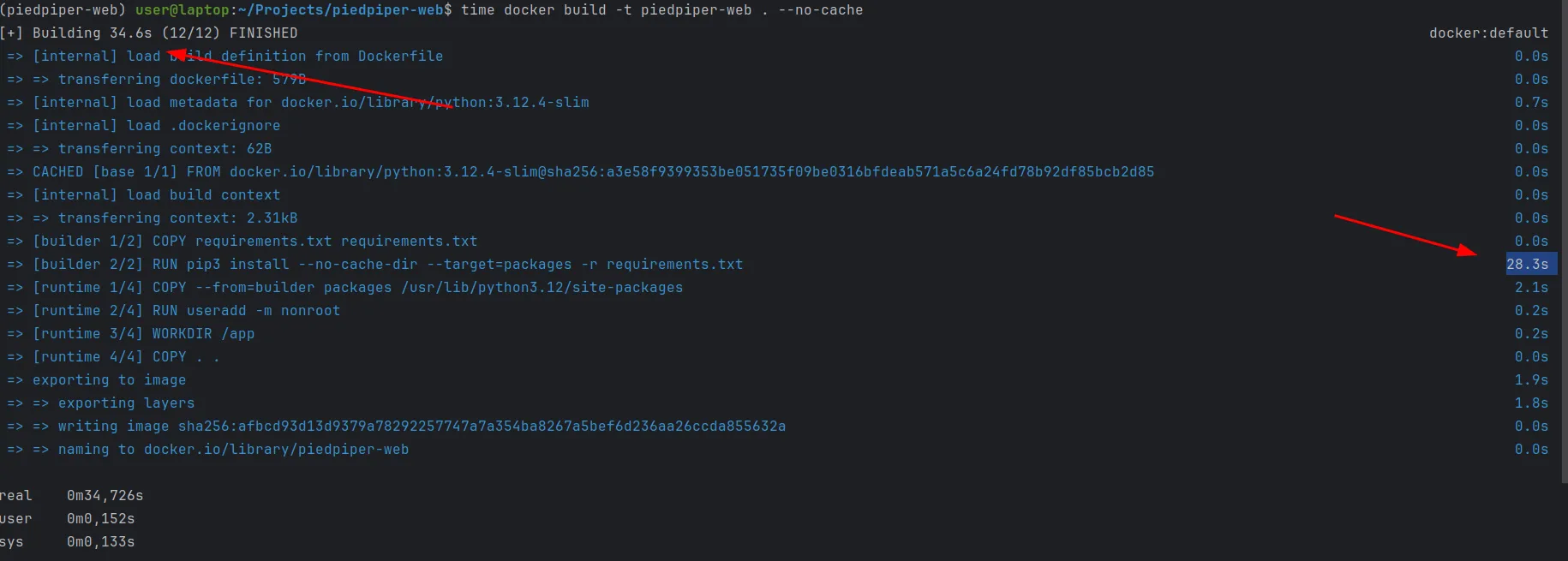
With the optimized Dockerfile, the build process completed in just 15.8s, with only 6.7s dedicated to installing dependencies. In contrast, the previous Dockerfile took 34.6s, spending 28.3s installing dependencies.
You can easily measure this improvement yourself by running:
time docker build -t container-name . --no-cacheAnd finally, here’s an example of pyproject.toml and docker-compose.yml part:
[project]name = "piedpiper-web"version = "0.1.0"description = "Piedpiper web"readme = "README.md"requires-python = ">=3.13"# Core application dependenciesdependencies = [ "boto3~=1.37", "dj-database-url==2.3.0", "dj-rest-auth==7.0.1", "django==5.1.7", "django-allauth==65.3.0", "django-autoslug==1.9.9", "django-configurations==2.5.1", "django-cors-headers==4.7.0", "django-filter==25.1", "django-model-utils==5.0.0", "django-role-permissions==3.2.0", "django-storages==1.14.5", "django-unique-upload==0.2.1", "djangorestframework==3.15.2", "djangorestframework-api-key==3.0.0", "djangorestframework-simplejwt==5.5.0", "gunicorn==23.0.0", "pillow~=11.1", "psycopg2-binary==2.9.10", "python-dotenv==1.0.1", "requests==2.32.3", "setuptools==77.0.3",][dependency-groups]# Linting and code quality dependencieslint = [ "black==25.1.0", "flake8==7.1.2", "isort==6.0.1", "pre-commit==4.2.0", "ruff==0.11.2",]# dev dependenciesdev = [ "django-silk>=5.3.2", "nplusone>=1.0.0", "ipdb==0.13.13", "ipython==8.34.0", "mock==5.2.0", "coverage~=7.7", "pytest-django==4.10.0", "factory-boy==3.3.3" "drf-yasg~=1.21",]docker-compose:
web: restart: always build: context: . dockerfile: Dockerfile target: builder command: bash scripts/start.sh working_dir: /app volumes: - ./:/app - /app/.venv ports: - "8000:8000" depends_on: - postgres env_file: - .envMore resources
- Official documentation
- uv: An In-Depth Guide to Python’s Fast and Ambitious New Package Manager
- Best practice Dockerfile for Python with uv
Hope it was useful, Thanks for reading 🙌